 Zigzag
AI strikes again, but this time with
Chats & terminals your whole team shares
Richard Morning! The API docs are done 📄
Matt Thanks Richard 🙌
Alice The new settings page is on staging
Richard Looks great!
Matt Bob, can we add a dark mode toggle to settings?
Bob On it, let's do it together 👇
↑ pushed 1 commit to main 4d7e219..c81a5f0
• c81a5f0 Add dark mode toggle to settings — Bob
Matt That was fast 🚀
Alice The Q4 roadmap is in the doc 🗺️
Matt Customers keep asking for CSV exports
Alice Let's start with the reports page
Matt Bob, can people export their reports as CSV?
Bob Sure, let's ask pi 👇
↑ pushed 1 commit to main c81a5f0..9b2e4d1
• 9b2e4d1 Add CSV export to reports — Bob
Matt Customers will love this 🙌
Richard Release 1.2.0 goes out Thursday
Alice Design QA is done ✅
Matt Docs are updated too
Richard Bob, can you bump the version and write the changelog?
Bob Leave it to pi 👇
↑ pushed 1 commit to main 9b2e4d1..e37a0c8
• e37a0c8 Release 1.2.0 — Bob
Richard Ready to ship 🚢
Matt Standup in 5 ⏰
Alice Running late, start without me
Richard Yesterday: API docs. Today: the SDK guide
Matt Bob, any blockers?
Bob Just the flaky login test. Let's fix it 👇
↑ pushed 1 commit to main 9e1f3aa..5c0b7d2
• 5c0b7d2 Fix the flaky login test — Bob
Matt No more blockers 🎉
Matt Did you see the new landing page?
Bob Looks great!
Matt The hero image is huge on phones though 😅
Bob Fixing it now 👇
↑ pushed 1 commit to main 1a6c3e9..7f42b80
• 7f42b80 Shrink the hero image on phones — Bob
Matt Perfect, thanks! 👌
Alice Heading out for lunch 🥪
Alice Before I go: the pricing page says "Montly" 🙈
Bob On it 👇
↑ pushed 1 commit to main 7f42b80..b19d5e6
• b19d5e6 Fix a typo on the pricing page — Bob
Alice You're the best 🙏
Richard The API docs are live 📄
Bob Nice work!
Richard Could you link them from the site footer?
Bob Sure 👇
↑ pushed 1 commit to main b19d5e6..2c8a4f1
• 2c8a4f1 Link the API docs from the footer — Bob
Richard Thanks Bob! 🙌
✓ Repo connected
on
bob@laptop:~/website$
π pi · coding agent
> Add a dark mode toggle to the settings page
● Read src/settings.js
● Edit src/settings.js
+ <Toggle label="Dark mode" />
+ theme.set(on ? 'dark' : 'light')
● npm test ✓ 24 passed
● git commit -m "Add dark mode toggle to settings"
● git push origin main ✓
bob@laptop:~/app$
π pi · coding agent
> Add a CSV export button to the reports page
● Read src/reports.js
● Edit src/reports.js
+ <Button onClick={exportCsv}>Export CSV</Button>
+ download(toCsv(rows), 'report.csv')
● npm test ✓ 31 passed
● git commit -m "Add CSV export to reports"
● git push origin main ✓
bob@laptop:~/website$
π pi · coding agent
> Bump the version to 1.2.0 and update the changelog
● git log v1.1.0..HEAD 14 commits
● Edit package.json
+ "version": "1.2.0"
● Edit CHANGELOG.md
+ ## 1.2.0 · Dark mode, CSV export, faster search
● git commit -m "Release 1.2.0"
● git push origin main --tags ✓
bob@laptop:~/app$
π pi · coding agent
> Fix the flaky login test
● npm test login ✗ 1 failed
● Read tests/login.test.js
● Edit tests/login.test.js
+ await page.waitForURL('/home')
● npm test login ✓ 12 passed
● git commit -m "Fix the flaky login test"
● git push origin main ✓
bob@laptop:~/website$
π pi · coding agent
> Make the hero image smaller on phones
● Read src/styles/hero.css
● Edit src/styles/hero.css
+ @media (max-width: 760px) {
+ .hero img { max-width: 80%; }
+ }
● git commit -m "Shrink the hero image on phones"
● git push origin main ✓
bob@laptop:~/website$
π pi · coding agent
> Fix the "Montly" typo on the pricing page
● Search "Montly" 1 match in src/pricing.html
● Edit src/pricing.html
- <h3>Montly</h3>
+ <h3>Monthly</h3>
● git commit -m "Fix a typo on the pricing page"
● git push origin main ✓
bob@laptop:~/website$
π pi · coding agent
> Add a link to the API docs in the footer
● Read src/footer.html
● Edit src/footer.html
+ <a href="/docs/api">API docs</a>
● npm run build ✓
● git commit -m "Link the API docs from the footer"
● git push origin main ✓
AI agents
Meet your AI teammates
Type @ in any topic and let them do the work.
Decentralized
Your team, your server.
Zigzag is built on Matrix, an open standard. Run your own server or use ours. Your chats, code and terminals stay where you decide, and teams on different servers still work together.
Projects
Every conversation has a place
Group topics into color-coded projects and see them all at a glance.

Git repos
Your code lives where your team talks
Push with plain git, and every commit shows up in the conversation.

Calls
Jump on a call without leaving the chat
Voice and video in any topic or DM, with screen sharing.
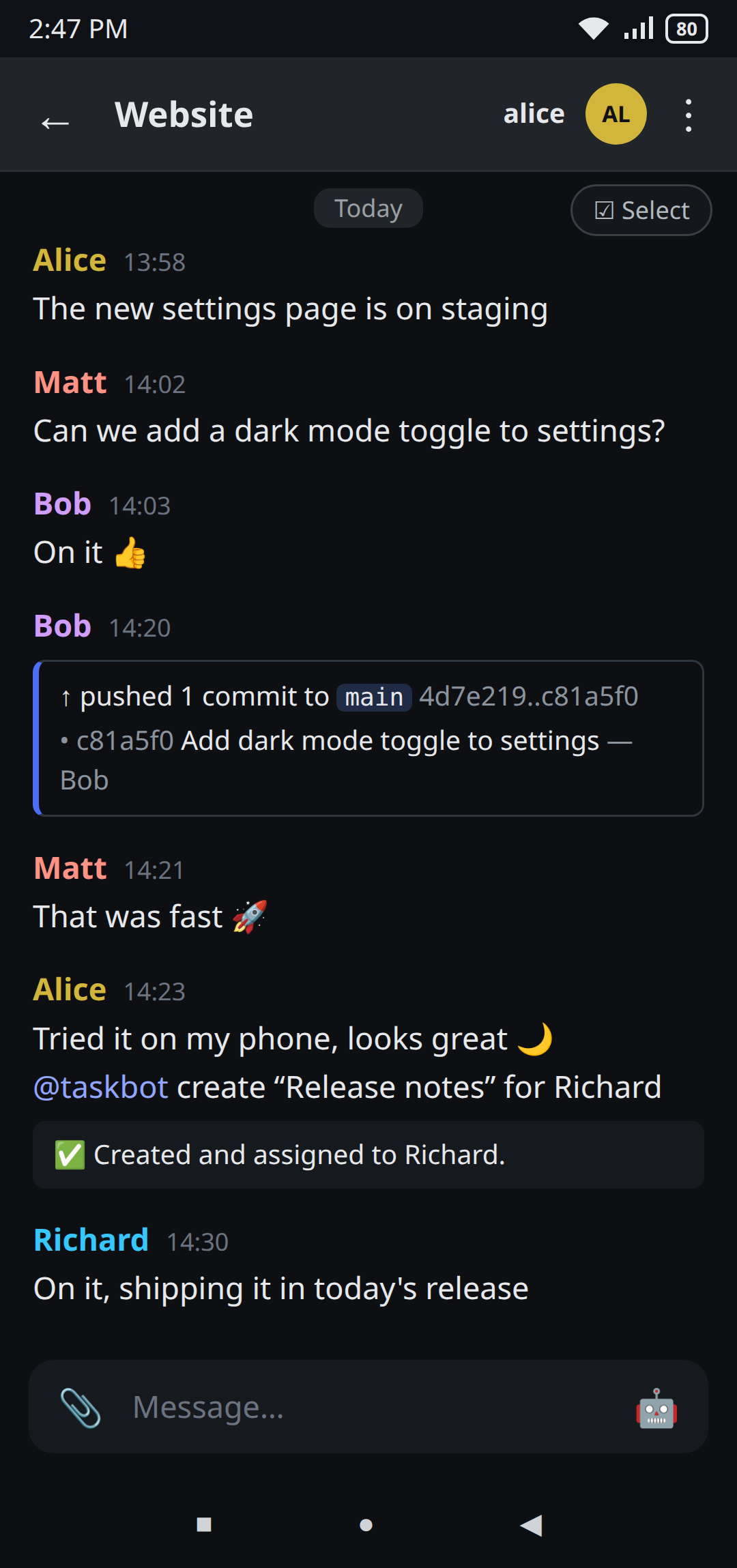
Mobile
Take your team with you
Zigzag runs on Linux, macOS and Windows, and comes with you on Android. Follow every topic, push and task from your phone.
Customizable
Make it yours
Point your agent of choice at one and put them to work, together. Claude Code, Codex, Gemini CLI, pi, etc. All are welcome, and every commit shows up in Zigzag.
Alice The new settings page is on staging
Matt Can we add a dark mode toggle to settings?
Bob On it 👍
↑ pushed 1 commit to main 4d7e219..c81a5f0
• c81a5f0 Add dark mode toggle to settings — Bob
🚀 Deploydeploybot Deploying c81a5f0 to staging…✓ c81a5f0 is live on staging
Matt Checked it on staging, ship it 🚀
● website-team
History
c81a5f0Add dark mode toggle to settings Bob · 1h4d7e219New settings page Alice · 3h9a1b2c3Team colors in the sidebar Matt · yesterday5e6f7a8Start website-team from Zigzag's UI Alice · last week
Members · 4
- ● Alice you
- ● Matt online
- ● Bob online
- ● deploybot bot
MCP
Let AI control your chat app
Zigzag comes with an MCP server. Connect your AI assistant and it reads topics, posts messages, opens new topics and invites people for you.
> Catch me up on Website and tell the team the release is ready
● zigzag · read_room Website
✓ 30 messages
Alice put the new settings page on staging and Richard finished the API docs.
● zigzag · send_message Website
✓ Sent
Done. The team knows the release is ready.
Matt Can we ship this week?
Alice The new settings page is on staging
Richard The API docs are done 📄
Bob 🚀 Release 1.2.0 is ready: the settings page and the API docs are in. Give it a last look!
Matt On it 👀
And more
Everything else, in one place
The small features that make a big difference.
-
Dark mode
Light or dark, whichever you like. Try the moon in the menu.
-
Encryption
End-to-end encrypted messages. Only your team can read them.
-
Threads
Reply in a thread and keep the topic tidy.
-
Admin API
Manage users and rooms on your server from your own scripts.
Get started
Ready to bring your team together?
Download Zigzag for Linux, macOS, Windows and Android.
Download